RadarX: Weather Radar/Forecast
4.622.50KReviews
Analysis ByAppCompare
I installed RadarX: Weather Radar/Forecast to see whether it could become my everyday weather tool rather than just another app I open before leaving home. My first impression is that it is focused and practical: this is a weather app built around radar, alerts, and forecasts, not a crowded dashboard trying to do everything at once. That focus makes it especially useful when I care about what is moving toward me, how soon conditions may change, and whether an outdoor plan needs a backup.
The app is free to download, with optional in-app purchases priced from $4.99 to $5.99 per item. Appd Lab LLC has kept it available for a long time, and its current version is 2.5.22. It is rated for Everyone and works on Android devices running Android 6.0 or later. Those details make it accessible to people using older phones, although the experience can still vary depending on the age and condition of the device.
How RadarX feels during ordinary weather checks
The strongest part of the experience is the sense of purpose. When I open a traditional weather app, I often have to move past several panels before reaching the information I actually need. RadarX puts the radar-centered view at the heart of the experience, which suits quick decisions: should I walk now, wait for a shower to pass, or take an umbrella?
Perceived speed matters more in a weather app than flashy presentation. A forecast is most useful when I can check it quickly while standing by the door, getting ready for work, or deciding whether to continue a bike ride. RadarX feels designed for those short visits. I do not need to spend much time learning where its main purpose is, and the radar emphasis gives the app a clear identity.
That does not mean every weather check feels identical. Radar displays naturally ask more from a phone than a simple temperature screen, especially when the map is moving or when I am checking a wider area. On a recent device, the experience should feel more comfortable than on an older handset with limited memory. I would not judge the app only by how quickly a static forecast appears, because the radar layer is doing more visual work.
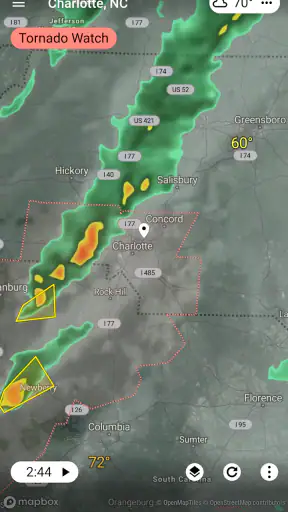
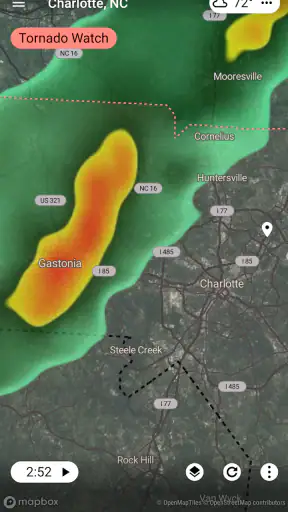
One useful habit is to use the radar before relying on a broad daily forecast. A daily forecast may tell me that rain is possible, but the radar helps me think in terms of movement and timing. I can check whether the rain is already nearby, whether a gap is opening, or whether the apparent break is too short to matter. That distinction is one of the reasons I would choose this app over a basic weather widget.
A realistic morning and commute workflow
Imagine I am leaving for work on foot. The sky looks gray, but there is no rain at the moment. Instead of assuming the whole morning will be wet, I can open RadarX, inspect the nearby radar pattern, and compare that visual information with the forecast. If the weather is approaching from the direction of my route, I might leave earlier or bring rain protection. If the activity is moving away, I may decide that waiting a few minutes is worthwhile.
This workflow is more useful than repeatedly refreshing a temperature reading. It turns the app into a decision tool. The same approach works for walking a dog, taking children to a park, planning a short drive, or deciding whether to start outdoor work. I especially like that the radar can answer a question that a normal forecast often leaves vague: is the weather likely to affect me soon, or is it simply somewhere in the wider region?
For a longer trip, I would not treat one quick glance as enough. Weather can change, and a radar image is not a guarantee about the exact conditions at my destination. I would check the starting point, the route, and the destination separately when the plan matters. That is a small but important trade-off: RadarX makes local weather movement easier to understand, but it does not remove the need for judgment.
What happens when I use it during busy weather
Heavy rain, storms, and rapidly changing conditions are when a radar app earns its place. During those moments, I am more likely to open the app repeatedly, zoom around, check alerts, and compare the current picture with the forecast. This is also when a phone has to work harder, because map-based weather information is more demanding than a plain text update.
RadarX’s design is well matched to that kind of use. Instead of asking me to interpret a long weather article, it gives me a visual starting point. I can look for the direction of movement and judge whether the worst conditions are approaching or moving on. That is particularly helpful when I am deciding whether to drive now or postpone a trip.
There is a practical limitation, though. A radar image can make a situation look more precise than it really is. Small gaps in precipitation may not remain gaps by the time I reach them, and conditions can differ from one neighborhood to the next. I use the radar as evidence, not as a promise. Alerts and forecasts are valuable here because they add another layer of context instead of leaving me with the map alone.
Repeated checks can also affect battery life more than occasional forecast reading, especially if I keep the radar visible and actively explore the map. I would not call that a reason to avoid the app, but it is worth remembering during a long day outdoors. If my phone is already low on power, I would check the important information before leaving and avoid keeping the radar open unnecessarily.
Alerts are most useful when they support a routine
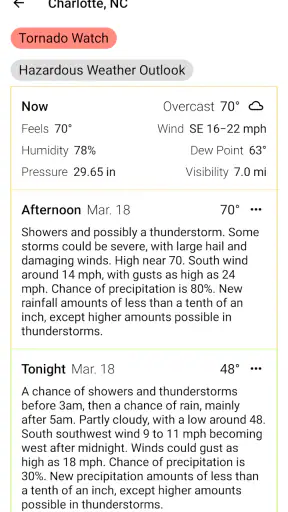
Weather alerts are easy to ignore when they arrive too often, so I prefer using them as a backup to a simple routine. I check RadarX before an outdoor plan, then pay attention to alerts when conditions may become more serious or change faster than expected. That combination feels more sensible than depending entirely on notifications.
The app is a good fit for someone who wants weather information to come to them as well as being available on demand. It can be reassuring when I am traveling, working outside, or responsible for a child’s schedule. At the same time, I would not turn on every possible alert without thinking about it. Too many interruptions can make important warnings blend into ordinary updates.
For people who need official emergency instructions, RadarX should be treated as one source rather than the only source. A radar view and an alert can help me notice a developing issue, but serious weather decisions may require local authorities and emergency services. That is not a weakness unique to this app; it is simply the right way to use consumer weather software.
Stability, recovery, and the value of a focused interface
My view of reliability is not just whether an app opens. It is also whether I can quickly return to the information I wanted after switching to another app, receiving a call, or checking a message. RadarX benefits from its focused purpose because I am less likely to get lost in unnecessary screens. When I come back to it, I know I am looking for radar, forecasts, or alerts.
Weather apps depend on current information, so network conditions are part of the experience even when the app itself is working correctly. In a basement, on a weak mobile connection, or while traveling through an area with poor coverage, map-based weather may take longer to become useful. I would not interpret every delay as an app failure. The practical response is to check important information before entering a low-signal area and to avoid waiting until the last second before a journey.
The app’s long presence in the weather category is encouraging, and its user response is strong: it holds a 4.6 average from around 69 thousand ratings, with roughly 22 thousand written reviews. It has also passed one million installs. Those figures do not guarantee that it will behave perfectly on every phone, but they suggest that RadarX has found a substantial audience and remained useful to many people over time.
Recovery is especially important during sudden weather. If I leave the app to answer a call and return a moment later, I want to resume the check rather than start a completely different task. A focused weather workflow helps here. Still, I would avoid making an urgent safety decision based on one glance after reopening; I would give the current radar and alert information a moment to refresh before acting.
Older phones and everyday device constraints
Because RadarX supports Android 6.0 and later, it can serve people who are not using a recent phone. That is a meaningful advantage for a weather app, since many users want dependable utility without replacing a device. However, operating-system compatibility is only the starting point. Older hardware may handle animated maps, repeated refreshes, and multitasking less comfortably than newer hardware.
If I were using an older phone, I would keep my workflow simple: open the app for a quick radar check, inspect the forecast, and close it when finished. I would avoid leaving a detailed map running in the background for long periods. This approach reduces unnecessary strain and makes the app feel more like a tool than a constantly active display.
Screen size also changes how useful the radar feels. A larger display makes it easier to understand movement across a wider area, while a small screen may require more zooming and panning. That is not a deal-breaker, but it affects who will enjoy the app most. Someone who wants a glanceable temperature and nothing else may prefer a compact widget, whereas someone who wants to inspect weather movement can benefit from the larger visual space.
Storage and data habits are also worth considering in a general sense. I would use a Wi-Fi connection when preparing for a trip and avoid unnecessary repeated map checks when mobile data is limited. The app’s free entry point makes it easy to try, but optional purchases mean I would look carefully at what I actually need before paying. The purchase range is modest, yet the right choice depends on whether the extra value fits my routine rather than on the price alone.
Where it beats ordinary weather alternatives
Compared with a basic weather widget, RadarX gives me more context. A widget is excellent when I only need the current temperature or a quick forecast glance. It is less helpful when I want to know whether rain is moving toward my neighborhood. RadarX is the better choice when timing and movement matter.
Compared with a general weather app that combines maps, news, lifestyle information, and many decorative panels, RadarX feels more direct. That can make it faster to understand, particularly when I am in a hurry. The trade-off is that people who enjoy a broad all-in-one weather dashboard may find its focused approach less satisfying.
Compared with checking a browser, the dedicated app is more convenient for repeated checks and alerts. I do not have to begin from a search page each time. On the other hand, a browser can be useful when I want to compare several locations quickly or consult a separate official source. RadarX is strongest as a regular personal weather companion, not as a replacement for every possible weather reference.
Compared with a simple forecast-only app, the radar emphasis is the deciding factor. If I mostly care about temperatures for the week, sunrise planning, or a minimal daily summary, another app may suit me better. If I often ask whether precipitation is approaching right now, RadarX is more aligned with that question.
Who should use it, and who should skip it?
I would recommend RadarX to commuters, walkers, cyclists, parents arranging outdoor activities, travelers, and anyone whose plans are affected by short-term rain or storms. It is also a sensible option for people who want a focused weather app that works on an older Android version and does not require an expensive starting commitment.
I would be more cautious about recommending it to someone who wants a purely passive experience. If the ideal weather app for you is a tiny widget that never asks you to inspect a map, the radar-centered design may feel like more than you need. It may also be the wrong choice for users who expect exact certainty several hours ahead. Radar helps with awareness, but it cannot eliminate changing conditions.
People with limited battery or mobile data should use it selectively, especially during extended radar viewing. My practical advice is to check the radar before leaving, use alerts thoughtfully, and avoid treating the moving map as something that must remain open all day. That workflow preserves the app’s main benefit without turning it into a constant drain on attention or resources.
My performance verdict after living with it
RadarX succeeds because it answers a specific everyday question well: what is the weather doing near me, and should it change my plan? Its radar, forecast, and alert combination gives me more useful context than a simple temperature display, while its focused layout avoids the clutter I often associate with broad weather platforms.
I would not describe it as a universal replacement for every weather source. Network conditions, device age, screen size, battery limits, and the uncertainty of radar interpretation all matter. The optional purchases also mean I would try the free experience first and only spend money if the added value clearly matches my habits.
Still, the overall balance is convincing. Appd Lab LLC has built a weather app with a clear purpose, broad accessibility, and a strong user response. For quick checks before a commute, closer monitoring during unsettled weather, and practical decisions about outdoor plans, the radar-first approach is the feature that makes the app worth keeping.
My final recommendation is simple: choose it if you want to understand approaching weather rather than merely read a temperature. Skip it if you prefer a minimal widget or need a comprehensive official emergency-information tool. For everyone in between, RadarX: Weather Radar/Forecast is a useful free starting point, particularly when a forecast alone leaves too much uncertainty about what is happening nearby.
FAQ
What is RadarX: Weather Radar/Forecast used for?
RadarX: Weather Radar/Forecast is designed to help you monitor current weather conditions and approaching precipitation. The app provides radar imagery, forecast information, and weather alerts in a convenient mobile interface. It can be useful for checking rain or snow movement, planning outdoor activities, and keeping track of changing conditions in your local area or other saved locations.
Does RadarX provide real-time weather radar information?
RadarX offers radar-based weather information intended to show precipitation activity and its movement over time. The exact update frequency and available coverage can depend on your location, data providers, and internet connection. Radar imagery should be treated as a helpful guide rather than a guarantee, especially during rapidly developing storms or in areas where radar coverage is limited.
Can I use RadarX to receive severe weather alerts?
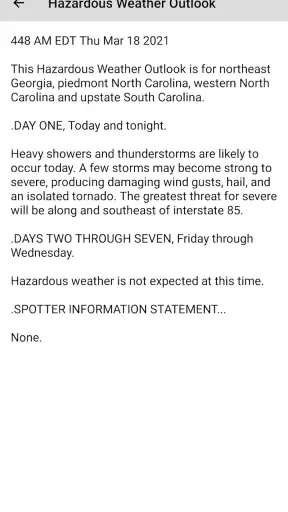
The app may provide weather warnings or notifications for significant conditions, depending on your region, device settings, and the permissions you grant. Before relying on alerts, enable notifications and location access where appropriate, then review the app’s warning settings. For dangerous weather, always compare information with official local emergency services and government weather agencies.
Does RadarX: Weather Radar/Forecast require an internet connection?
Most of RadarX’s main features, including current radar images, updated forecasts, and weather warnings, generally require an active internet connection because the app retrieves changing data from online services. Some previously loaded information may remain visible temporarily, but users should not expect complete offline functionality. Mobile data usage can also increase when frequently refreshing radar maps.
Is RadarX free to download, and are there in-app purchases?
RadarX can typically be downloaded without an upfront charge, but availability of premium features, advertising, or subscription options may vary by platform and region. Before installing, check the Google Play Store or Apple App Store listing for the current pricing details. Review any trial terms and renewal conditions carefully if you decide to unlock additional features.
Pros
- Clear radar maps make it easy to track approaching storms.
- Provides useful precipitation forecasts for planning outdoor activities.
- Weather alerts help users stay informed about changing conditions.
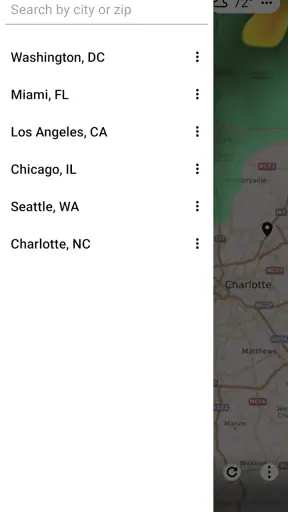
- Location search makes it convenient to monitor multiple areas.
- The interface is generally simple to navigate and understand.
Cons
- Some advanced radar features may require a paid subscription.
- Radar loading can be slow with weak or unstable connections.
- Forecast accuracy may vary by location and local data coverage.
- Frequent alerts can become distracting if not customized.
- The app may use noticeable battery and mobile data during live tracking.